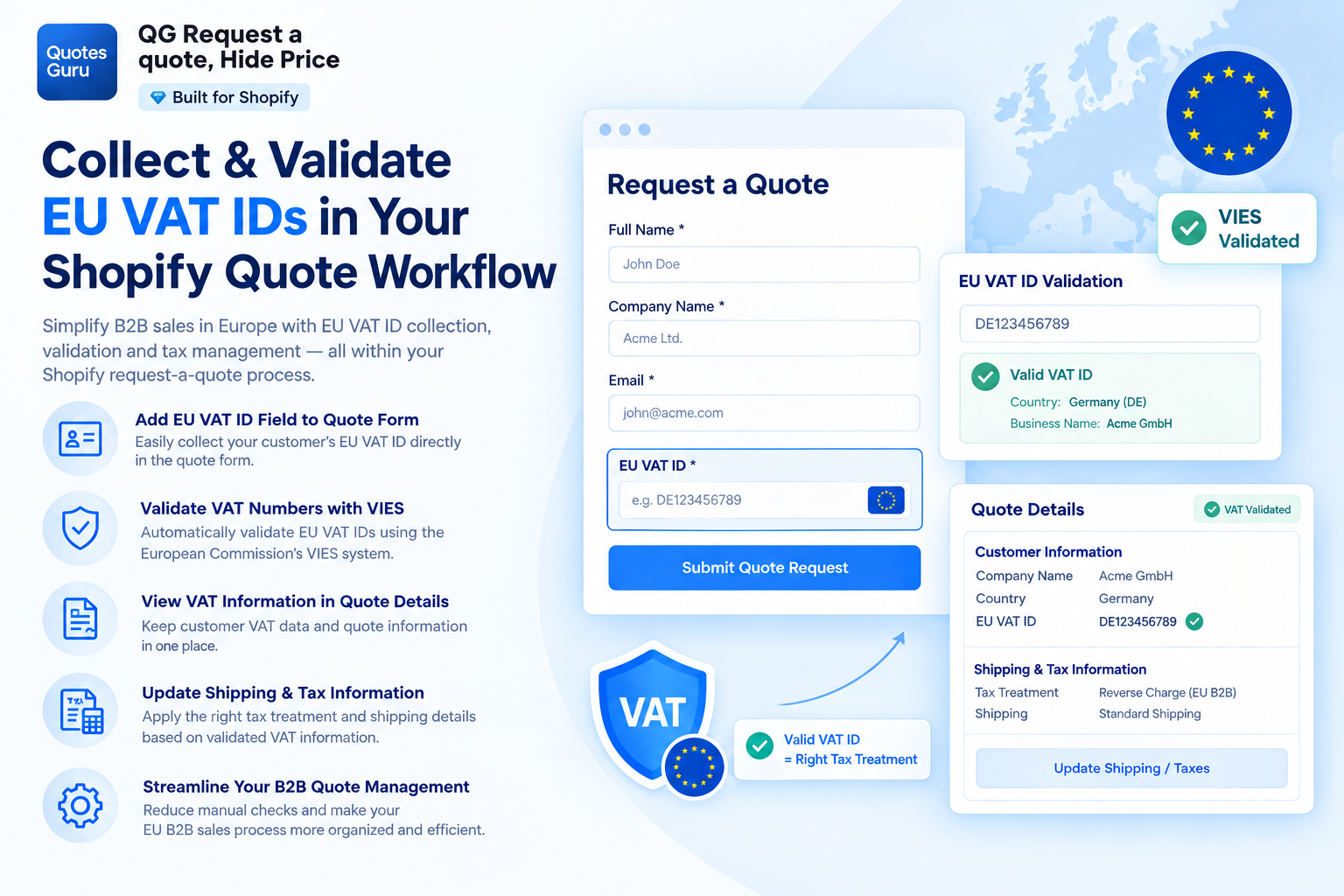
For Shopify stores selling to businesses across Europe, a request-a-quote workflow can become more complicated when EU VAT requirements are involved. Merchants may need to collect a customer’s VAT ID, verify the information provided, and make sure the appropriate tax treatment is applied to an eligible quote or transaction.
While Shopify provides tools for managing taxes and VAT, handling VAT information directly within a B2B quotation or request-a-quote workflow can require additional functionality. This is especially relevant for stores that hide prices, negotiate custom pricing, or create quotes and draft orders for business customers.

Quotes Guru: RFQ & Hide Prices helps Shopify merchants manage request-for-quote workflows while collecting and validating EU VAT IDs as part of the quotation process.
In this guide, we’ll look at why EU VAT information matters for B2B Shopify quotes and how Quotes Guru can help merchants collect, validate, and use VAT information during the quote process.
Important: EU VAT treatment depends on factors such as the merchant’s location, the customer’s location and VAT status, the type of goods or services supplied, and the specific transaction. A valid VAT ID does not by itself guarantee a VAT-free transaction. This article is for general informational purposes and is not tax or legal advice. Merchants should confirm their VAT obligations and tax treatment with the relevant tax authority or a qualified tax professional.
Why EU VAT Matters When Creating B2B Quotes on Shopify
For B2B Shopify stores selling across European countries, VAT information can be an important part of the quotation process.
When a business customer submits a quote request, the merchant may need to know whether the customer is a registered business and collect relevant VAT information before determining the appropriate tax treatment.
This can become challenging when the store’s standard purchasing process does not include the VAT information required for a custom quotation.
For example, a merchant may need to:
- Collect the customer’s EU VAT ID during the quote request
- Review the VAT ID provided by the customer
- Validate the VAT number
- Consider the customer’s country and VAT status
- Update the quote’s shipping and tax information
- Maintain VAT information alongside the customer’s quotation
How to Collect and Validate an EU VAT ID in a Shopify Quote Guru
With Quotes Guru, merchants can add an EU VAT ID field to their quote form and validate the VAT number submitted by the customer.
Step 1: Add the EU VAT ID Field to the Quote Form
Go to:
Quotes Guru: RFQ → General Settings → Customize Quote Forms
Select the quote form you want to customize.
Click Add New Field and select EU VAT ID from the available fields.
Save the quote form after adding the field.
The EU VAT ID field will then be displayed to customers when they submit a quote request.
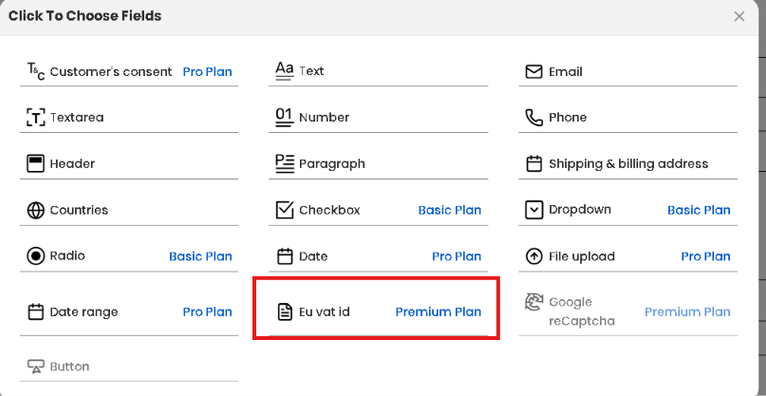
This allows business customers to provide their VAT number together with the other information required for their quotation.
Step 2: Enable EU VAT ID Settings
After adding the field to the quote form, configure the EU VAT settings.
From your Shopify admin, go to:
Apps → Quotes Guru: RFQ → General Settings → Miscellaneous Settings
Scroll down to the EU VAT ID section.
Enable EU VAT ID Entry and Tax Exemption Support in Quotes.
This allows the app to incorporate EU VAT information into the quote workflow.

Step 3: View the Customer’s EU VAT ID
Once a customer submits a quote request, the submitted VAT information can be reviewed from the quote details.
Go to:
Quotes Guru: RFQ → Quote Listing
Open the relevant quote.
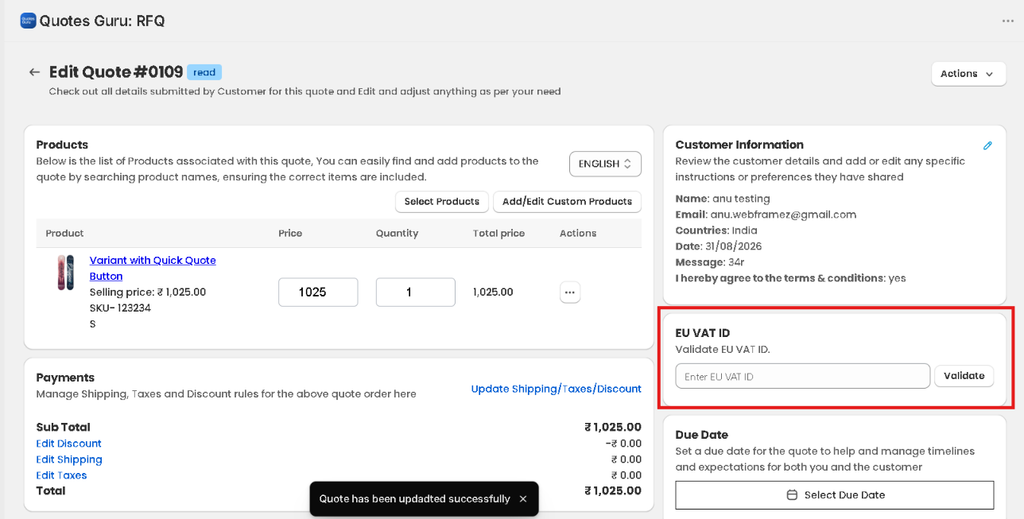
In the Customer Information section, the customer’s submitted information will be displayed. If the customer has provided an EU VAT ID, a separate EU VAT ID section will appear on the quote.
This gives merchants a convenient place to review the VAT information associated with a specific quotation.
Step 4: Validate the EU VAT ID
After reviewing the customer’s VAT ID, click Validate.
Quotes Guru checks the submitted VAT number through the applicable VAT validation service.
The European Commission’s VIES (VAT Information Exchange System) is used to check VAT numbers issued to businesses registered in EU member states.
VAT validation can help merchants verify the information supplied by a B2B customer before proceeding with the relevant tax treatment.
However, validation of a VAT number should not be treated as automatic confirmation that every transaction qualifies for VAT exemption or reverse-charge treatment. Merchants should still consider the complete circumstances of the transaction and their applicable VAT obligations.
Step 5: Update Shipping and Tax Information
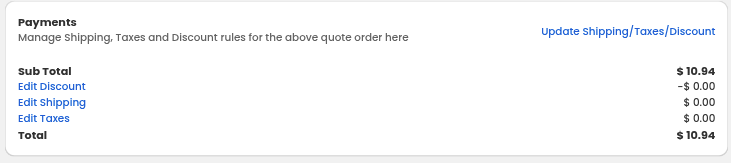
After successfully validating the VAT ID, click Update Shipping/Taxes to update the quote’s shipping and tax information.
This helps merchants keep the quotation aligned with the VAT information collected during the quote process.
Instead of collecting the VAT ID through email or manually checking it outside the quotation workflow, merchants can manage the relevant information directly within Quotes Guru.
Note: Quotes Guru’s interface and setting names may change as the app is updated. For the latest configuration instructions, refer to the official EU VAT ID documentation.
Why Use an EU VAT ID Feature in a Shopify Request-a-Quote Workflow?
For merchants selling to B2B customers in Europe, VAT information can become an important part of the quotation process.
Using an app that supports EU VAT ID collection and validation can help merchants organize this information alongside their quote requests.
Collect VAT Information During the Quote Request
Customers can provide their EU VAT ID directly through the quote form rather than sending it separately by email.
Validate Customer VAT IDs
Merchants can validate the VAT number submitted by a customer before proceeding with the applicable quotation and tax workflow
Keep VAT Information With the Quote
The VAT ID is displayed within the quote details, making it easier for merchants to review customer and VAT information in one place.
Reduce Manual VAT Verification
Instead of moving between separate systems to collect and review VAT information, merchants can incorporate the process into their existing request-a-quote workflow.
Support B2B Quote Management
For stores that negotiate prices or create custom quotations for business customers, collecting VAT information as part of the quote process can make the workflow more structured.
Who Can Benefit From Quotes Guru’s EU VAT ID Support?
Quotes Guru can be particularly useful for Shopify merchants that:
- Sell products to B2B customers across the EU
- Use a request-a-quote or quotation-based purchasing model
- Hide prices from customers until a quote is requested
- Offer customer-specific or negotiated pricing
- Need to collect EU VAT IDs from business customers
- Want to validate VAT numbers as part of their quote workflow
- Need to manage shipping and tax information on quotations
For these merchants, the challenge is not simply understanding EU VAT. It is managing the VAT information within the actual B2B quotation process.
Quotes Guru brings these functions together so merchants can collect VAT information when the customer submits a quote and manage the relevant VAT details alongside the quotation.
Quotes Guru Pricing for EU VAT ID Support
The EU VAT ID feature is available with the Quotes Guru Premium plan, priced at $24.99/month.
The Premium plan includes EU VAT ID collection and validation along with the app’s other quote management features.
For Shopify merchants looking for a request-a-quote solution that combines B2B quotations, price hiding, and EU VAT ID support, this provides a way to manage these requirements within one Shopify workflow.
Final Thoughts: Simplify EU VAT Handling Within Your Shopify Quote Workflow
EU VAT requirements can become more complicated when a Shopify store sells to business customers across different European countries and uses a custom quotation process.
The challenge is not only determining the applicable VAT treatment. Merchants also need a practical way to collect customer VAT information, validate VAT IDs, and manage that information alongside their quotes.
This is where Quotes Guru: RFQ & Hide Prices can help.
With Quotes Guru, Shopify merchants can add an EU VAT ID field to their quote forms, collect VAT information from B2B customers, validate submitted VAT numbers, and update shipping and tax information within the quotation workflow.
For Shopify stores using request-a-quote functionality for European B2B sales, integrating EU VAT ID management into the quote process can make the overall workflow more organized and easier to manage.
To learn more about setting up EU VAT ID collection and validation in Quotes Guru, see the official EU VAT ID documentation.
Ready to add EU VAT ID support to your quote workflow?